
Getting a perfect 100 on Google PageSpeed is not a matter of luck, nor of installing miracle caching plugins. It requires a clean web architecture, surgical management of critical resources, extreme JavaScript optimization and a rigorous web performance strategy. In this article, we break down the exact step-by-step process we applied at ideariodigital.com to master Core Web Vitals, maximize load speed and turn our platform into a benchmark for technical efficiency and user experience. You can check our Google PageSpeed 100 test here to verify the actual score obtained through a technical audit.
Goal:
100/100
on Google PageSpeed
Focus:
Core Web Vitals & Web Performance
Level:
Technical / Advanced
PageSpeed Optimization: How to Get a Perfect Score on Google
- Introduction: The plugin myth and the reality of web performance
- Mastering Core Web Vitals: LCP, INP and CLS at 100%
- Surgical asset management: Eliminating blocking JavaScript
- Image optimization and next-gen formats (WebP / AVIF)
- Infrastructure, server and high-performance caching
- Deferred font loading and critical CSS
- Frequently Asked Questions about Google PageSpeed and Web Optimization
- Conclusion: Speed as a non-negotiable competitive advantage
Introduction: The plugin myth and the reality of web performance
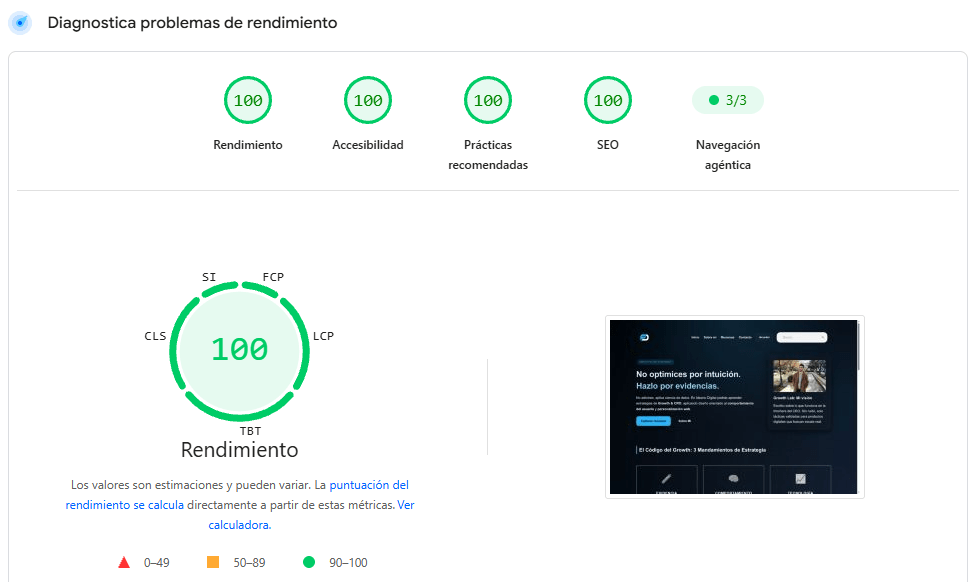
The vast majority of website administrators make the mistake of overloading their CMS with multiple bulk optimization plugins that promise miraculous results but end up weighing down browser execution. However, at ideariodigital.com we demonstrate with real data that the secret to reaching the coveted perfect score of 100 on Google PageSpeed doesn’t lie in generic automation, but in thoroughly understanding how the browser interprets code, processes the DOM and renders visual elements in milliseconds.
To master performance-based web optimization, master Core Web Vitals and learn how to improve website load speed for good, it is essential to rigorously audit your source code and eradicate unnecessary scripts. When you get the browser to cleanly download only what is strictly essential for the first screen, performance metrics in PageSpeed Insights 100 tools soar organically, radically boosting both your technical SEO rankings and your digital business’s conversion.
Mastering Core Web Vitals: LCP, INP and CLS at 100%
Google’s metrics measure three fundamental pillars that determine whether your website is fit for the top score in PageSpeed Insights 100: Largest Contentful Paint (LCP), Interaction to Next Paint (INP) and Cumulative Layout Shift (CLS) within the Core Web Vitals. A single poorly sized element can ruin your CLS, while a third-party script or advertising pixel can destroy your INP on mobile devices.
To fix this and learn how to improve website load speed for good, we apply advanced resource prioritization techniques, inlining critical styles (Critical CSS) and postponing any non-essential interactivity until the browser’s main thread is completely free. This not only helps to speed up WordPress PageSpeed or any other CMS, but also guarantees a smooth experience and perfect scores in performance measurement tools.
Surgical asset management: Eliminating blocking JavaScript
The Achilles’ heel of most websites is the massive execution of JavaScript during the initial load phase. PageSpeed Insights 100 tools severely penalize main thread blocking time. Our strategy consisted of thoroughly auditing every script, applying defer attributes and strict asynchronous loading to speed up WordPress PageSpeed or any other content management system dramatically.
In addition, it is vital to structure optimization experiments without overloading the DOM, a critical step if you want to master Core Web Vitals and learn how to improve website load speed. Just as we take care with the types of A/B tests to maintain mathematical accuracy, every script integrated into the website must justify its existence through rigorous performance audits and data-driven optimization.
Image optimization and next-gen formats (WebP / AVIF)
The weight of media files usually accounts for more than 70% of a web page’s total weight. To achieve the coveted PageSpeed Insights 100 score and master Core Web Vitals, resizing images is not enough; you must make the definitive leap to next-generation compression formats such as WebP or AVIF.
These modern formats offer drastically higher compression rates without sacrificing an ounce of visual quality, which lets you speed up WordPress PageSpeed immediately by cutting gigabytes of network transfer. By learning how to improve website load speed through lazy loading (native) and correctly specifying width and height dimensions in the DOM, we avoid layout shifts (CLS) and guarantee an outstanding, ultra-fast user experience.
Infrastructure, server and high-performance caching
No frontend code optimization will matter if your web server responds late. Achieving a TTFB (Time to First Byte) under 100 milliseconds is an essential requirement for mastering Core Web Vitals in complex projects. At ideariodigital.com we implement an optimized stack with latest-generation servers, advanced Brotli compression and a finely tuned Content Delivery Network (CDN).
Server-level cache persistence and the correct configuration of HTTP expiration headers prevent redundant requests, drastically reducing database load and delivering instant response speed from anywhere in the world.
Deferred font loading and critical CSS
External web fonts (such as Google Fonts) often cause flashes of invisible text (FOIT) and performance penalties if they are loaded through traditional render-blocking stylesheets. To solve this, we host fonts locally, use modern woff2 formats and apply rendering optimizations.
Likewise, extracting and injecting critical CSS directly into the HTML head lets the browser paint the layout instantly, while the remaining secondary styles load in the background without interrupting the user experience.
Frequently Asked Questions about Google PageSpeed and Web Optimization
Is it really possible to get 100 on PageSpeed with WordPress?
Yes, it is entirely possible to speed up WordPress PageSpeed to the highest technical level. Although WordPress has a reputation for being a heavy CMS due to the indiscriminate use of plugins and generic commercial themes, by implementing a clean architecture, optimized custom development, high-performance web hosting and strict asset management, you can reach a perfect score of 100 on Google PageSpeed on both mobile and desktop devices.
Which PageSpeed metric is the hardest to optimize on mobile devices?
In general, Largest Contentful Paint (LCP) and Total Blocking Time (TBT) / INP within the Core Web Vitals are the most complex to optimize on smartphones due to the limited processing power of mobile hardware and network latency. To overcome this barrier in PageSpeed Insights 100 reports, it is essential to compress main images as much as possible, implement lazy loading and minimize JavaScript execution on the main thread.
Do miracle web optimization plugins really work?
Automatic caching and optimization plugins are useful in early stages or for standard low-level setups. However, when the goal is to master performance metrics and truly understand how to improve website load speed to the fullest, these plugins often fall short or cause serious code conflicts. Manual, surgical optimization of the source code, inline critical CSS and expert server-level configuration will always outperform generic automation.
How does PageSpeed affect SEO rankings and conversions?
Google officially uses Core Web Vitals as a ranking factor within its search algorithm. Moreover, from a business and CRO standpoint, it has been empirically demonstrated that every second of delay in load speed drastically reduces the conversion rate and sends the bounce rate soaring. A website with perfect speed retains users more effectively and exponentially multiplies its commercial conversions.
How often should a website’s performance and speed be audited?
It is recommended to monitor and audit performance continuously using automated analysis tools. Every time you roll out a new feature, install a third-party script, update a plugin or add heavy content, your Google PageSpeed score can be degraded, so regular technical oversight is vital to maintain your site’s excellence.
What role does the server play in PageSpeed optimization?
The server is the foundation of any strategy focused on how to improve website load speed. A high TTFB (Time to First Byte) will ruin any frontend optimization effort. Using latest-generation servers, advanced Brotli compression, modern HTTP protocols and an optimized CDN guarantees the instant responses that are essential to reach the top score in PageSpeed Insights 100.
Conclusion: Speed as a non-negotiable competitive advantage
Reaching a perfect score of 100 on Google PageSpeed at ideariodigital.com was not a matter of chance, but the result of a rigorous technical approach that prioritizes efficiency, clean code and an advanced server architecture aimed at speeding up WordPress PageSpeed to the highest level. Load speed is no longer an optional technical detail; it is the fundamental foundation on which excellent Core Web Vitals, an optimal user experience and outstanding conversion rates are built.
If you apply these principles to your platform, optimize your tools on PageSpeed Insights 100 platforms and cut the unnecessary digital fat by knowing how to improve website load speed, you’ll see your metrics soar, your organic rankings on Google improve dramatically and your users enjoy a smooth, memorable browsing experience. Are you ready to take your website’s performance to the next level and achieve the highest technical score?